| home | sitemap | travel pix | interactive mathematics |


Algebrator review

Posted in Computers & Internet, Mathematics on 8 Nov 2007.
9 Comments

I recently obtained a copy of Algebrator from the vendors at Softmath.com.

Algebrator’s marketing claim is:

You Type in Your Homework Problem. Algebrator does the Rest!

For students, this is very appealing. They can get a good grade by copying the solutions provided by the software. And this is without having to do too much learning…

Algebrator is a similar product to Microsoft’s Math 3.0, which I reviewed recently (See MS Math 3.0 Review). The intended audience is similar for the 2 products: middle/secondary school and early college math students.

So let’s move on to my road-test of Algebrator.

Problem 1 - Solving an Exponential Equation

I started with a random problem and I was not very happy with the results. I entered the first line and then repeatedly hit the “Solve Step” button to obtain subsequent lines.

algebrator-solvestep

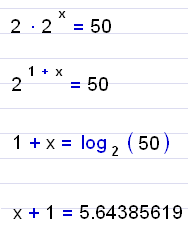
algebrator1

The second and third lines, provided by the software, are fine.

You can click on the “Explain” button to get a popup explanation of what the software has just done for you:

algebrator-explain

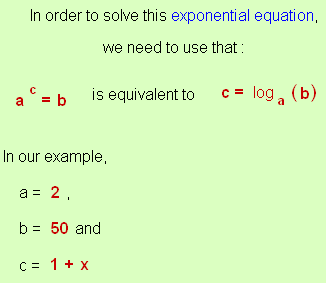
For the 3rd line, the explanation said:
algebrator1a

OK, fine. But where did the 4th line [the decimal value of log2(50)] come from? No explanation is given. I feel that this step would be a key stumbling block for most students. Since there is no “log base 2″ button on calculators, this step sorely needs a Change of Base explanation.

Now, most students will have no trouble solving the 4th line above:

x + 1 = 5.64385619

Not a biggie - just subtract 1 from both sides and you are done.

But let’s see what Algebrator does with it.

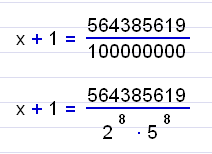
algebrator2

Say, what? Why are we going into fractions and then factoring the denominator? I immediately reach for the “Explain” button and get:

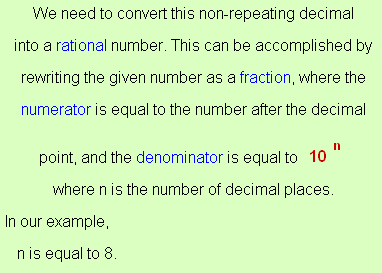
algebrator2a

I’m speechless. Why take a perfectly simple decimal and mess with it like this?

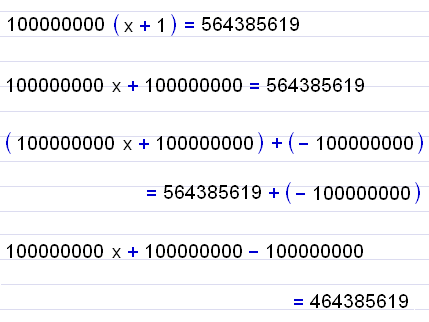
The next steps are similarly remarkable for their inanity. We immediately drop the factored denominator (why?) and go back to the 100 million format and multiply both sides.

Then we expand out the brackets.
algebrator3

Are you still with me on this? I was feeling very tired by this stage and we still don’t have a solution. Another few lines, now:
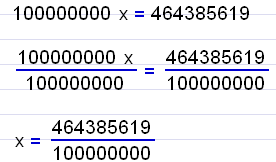
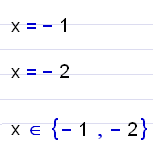
algebrator4

It stopped on this last line and refused to go any further. I still could not get my nice simple decimal answer. The explanation for the second last step says:
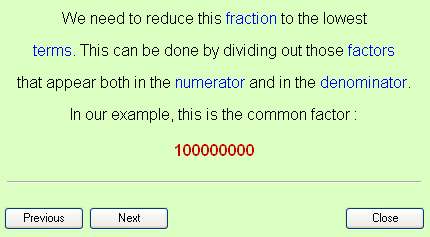
algebrator4a

But there was no explanation for finishing at the last step.

Notice the “Previous” and “Next” buttons? What I presume they are supposed to do is take you step-by-step through the solution. But in fact, they did not do anything at all. I had to “Close” the explanation window and then request another “Explanation” for each step. It was pretty tedious.

Problem 2 - Solving a Trinomial

Next I thought I would compare Algebrator’s solution for a simple trinomial (polynomial with 3 terms) equation. This is the same one I did on Microsoft Math 3.0 and I didn’t like their use of the Quadratic Formula, since factoring is a better way to attack the problem.

Algebrator does it using factoring by grouping, but in a way that I feel would confuse students. I don’t believe fractions are necessary in any of the steps. From the second line, we should go to the 5th line, then the 7th.
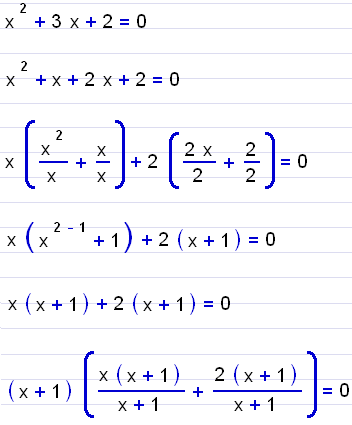
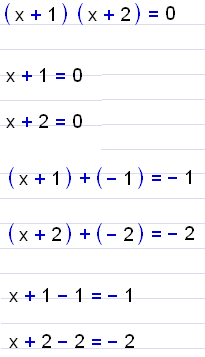
algebratorP2-1

algebratorP2-2

Almost done:

algebratorP2-3

Now to be fair, they have to write the algorithm to allow for all possibilities. When the numbers are not ‘nice’, all these steps may be necessary. But then again, if the numbers are not ‘nice’, we should be using Quadratic Formula.

Checking Solutions

One of the toolbar options is “Check Solution”.

algebrator-checksolution

Now, this seemed like a good idea to me - let the student enter their own solution and have the system check it. From a learning point of view, this is more desirable than spoon-feeding a (convoluted) answer to the student.

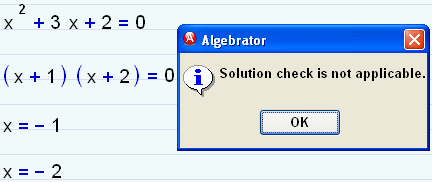
However, when I entered my solution to the above problem and asked it to “check solution”, this is what I got:

algebrator-solutioncheck

Hmm - time to read the instruction manual.

[When reviewing software like this, I feel that the interface should be intuitive enough that you don't need to go looking at user manuals to find out what to do. For most software, you have to reach for the manual, but that's another story.]

It turns out that:

The [Check solution] button checks whether the generated solution is correct. You are probably not going to use this button very often because, when necessary, the software incorporates the checking into the solution process (i.e. when solving a radical equation). You can use the “check solution” button when checking is not performed automatically (i.e. when solving a linear equation, or after finding the inverse of a matrix).

So it won’t check the student’s own work.

A bit later I noticed another button “Check Your Work“. Now we are getting somewhere:

algebrator-checkword

This is the feature that I expected earlier. I checked my solution and happily, it said that I was correct.

Here is a user interface issue. If the “Check Solution” button is rarely used, perhaps it should be hidden so that “Check Your Work” is more prominent.

I know that checking user input has huge challenges, but Scientific Notebook does a reasonable job of it.

Some of the “Problems” and “Formulas” (pre-built examples in Algebrator) do allow some user input.

3D Graphing

Algebrator is not capable of doing 3-D graphs, so I could not compare it with Math 3.0’s 3D capabilities.

2D Graphing

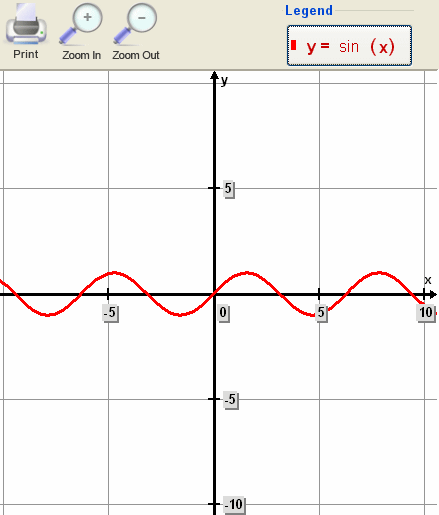
Let’s try graphing a sine curve.

I tried to type in y = sin(x), but Algebrator did not recognise it.

So I went looking for an input tool. This looked likely:

algebrator-toolbar

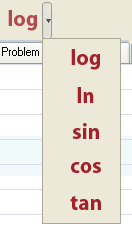
Under “log” I expected to find maybe “loge” (which is there, as “ln”) but there were other (somewhat unexpected) goodies including the trigonometric functions:
algebrator-toolbar2

After choosing “sin”, I expected “sin” to appear on the workspace, but alas, no. “Sin” now appears on that toolbar (in the place of “log”) and then you have to click it (again) to get “sin( )” on the work space. This is not normal Windows user-interface convention.

Anyway, it is now possible to obtain a sine graph using the “Graph” button on the toolbar:

algebrator-sin1

While the axis numbering is not very attractive, at least you can read it easily at all zoom levels (unlike the Microsoft Math 3.0 experience).

Zooming is quite easy - the cursor changes to a cross (+) and you can drag over an area of interest to effect a zoom.

One problem with the zooming feature is that you can only view graphs with equal x- and y- scales. There should be a rectangular view for graphs with a small y-scale compared to the x-scale in use.

Matrix Operations

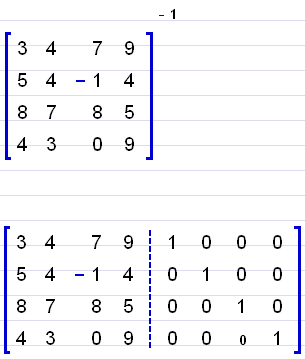
I tried the inverse of a 4×4 matrix. It uses Gauss-Jordan Elimination:
algebrator-matrix1

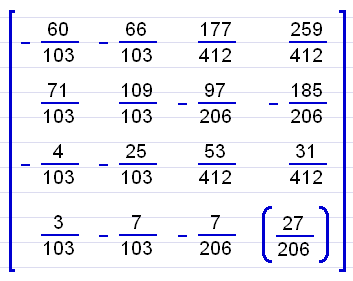
The process was quite extraordinary - after 136 steps (I counted them) we get our final answer:
algebrator-matrix2

(The answer is correct. :-) )

This is where I have a fundamental issue. It makes no sense to me for humans to churn through a process like this (or to follow through seeing what a machine is doing for us). We should use software to immediately find the final answer, and spend the time that we save talking about what a matrix is, what it can do for us, why we use them and when we use them. The steps here are not important.

If (masochistic) math teachers still get their students to do Gauss-Jordan Elimination even for 3×3 matrices, I think they are wasting everyone’s time (unless the students need to know the process for programming, or something).

(You may wish to see the approach I take in Inverse of a Matrix and also some further discussion in Dinosaur Mathematics).

Algebrator Gripes

  • You cannot highlight, delete or edit if you have made a mistake in the first line of your problem. I had to start a whole new problem and type most of it again.
  • Fonts are Arial - but they should be Times New Roman for variables for better readability.
  • It does not make enough use of context help (right clicking to give options, etc)
  • The blue-line/red margin workspace (designed to look like a paper-based workbook) is more distracting than helpful (the math does not line up on the blue lines, as you can see from the examples on this page).
  • There is no calculus facility with this software

Algebrator Bouquets

  • Font sizes are big and it is generally easy to read everything.
  • There are a lot of sample problems for students to learn from - possibly better than a textbook for some of them
  • User input of math expressions (like fractions, square root) is quite easy.
  • The “Explain” idea is good
  • There is some clever programming that has gone into Algebrator - it is not easy to cater for a huge range of possible input problems

Conclusion

I made the same comment in my MS Math 3.0 Review: The best learning outcome of a package like this would occur if students were required to input each step, and then get feedback on their input. What we currently have is a “teacher on the side” approach, but it comes across as a “teacher at the front doing lots of stuff that I still don’t get and I am just a spectator” approach.

No, involve the student at each step with prompts and with feedback. But avoid spoon-feeding since it is too teacher-centered and transmissionist.

MS Math 3.0 has a slick interface and includes calculus abilities. It also has 3D graphing, while Algebrator does not. With MS Math 3.0 selling for under USD$20 and Algebrator at just under USD$75 (with a ’search engine special’ of $50), I know which one is better value.

However, I’m not about to run out and buy either product, because I don’t feel that either one hits the ’sweet spot’ for mathematics education.

9 Comments


Book-mark this post

Book-mark this post in Del.icio.us, Furl, Digg, Stumble Upon, whatever...
Mouse-over the image and choose your bookmark:


Related articles

9 Comments »

  1. vlorbik said,

    November 14, 2007 at 9:39 pm

    nicely done; thanks!
    looks worse than useless to me …
    but then, i’m a pretty long way
    from their target audience.

  2. Neven Jurkovic said,

    November 14, 2007 at 11:24 pm

    First of all, thank you the detailed review of our software. Some of your suggestions will be implemented in the next release.
    I would like to address a few issues:

    1. Equation x + 1 = 5.64385619 was solved the way shown, because Solution |settings |Integer was on. For ‘normal’ solution the setting needs to be Real. The default is Integer because users typically want solution to equation such as 2x=3 to be x=3/2

    2. Previous and Next buttons take you through multiple transformations in one step (i.e. aa/bb ->a^2/b^2 will have two transformations. (It is our fault for not disabling buttons when only a single transformation is present)

    3. Algebrator can solve the quadratic equation by grouping, completing the square and using the quadratic formula. This can be accomplished via the Solution | Settings dialog

    4. Number of steps can be controlled via visibility setting (click on visibility on main menu bar). The matrix problem will show 13 steps when visibility is set on low. Some students need more and some less details

    5. Regarding the ‘fundamental issue’ of showing the steps – the primary reason for existence of Algebrator is to show steps and explanations. The fact is that 90% of teachers still do require students to provide steps – Algebrator is here to fill that need.

    6. “Gripes” - In regards to editing the user entered problem – you can do it (just double click on it). The other gripes do have merit.

    7. Finally – comparison to MS math software. From your comment, one gets the feeling that both programs provide steps ; MS math is cheaper and does calculus so it is better value for the money. The fact is that the MS can give steps for a very small subset of problems it solves. Also it gets stuck on simplifying problems as simple as (x^2-y^2)/(x-y). There is a good reason for it – an extreme amount of time was spent on making Algebrator a general step-by-step solver. If we were to spend this amount on developing ‘no-step’ solution processes, its capabilities would by far surpass MS-math’s. Eventually, Algebrator will cover calculus as well – when it does , it will be done thoroughly (MS-math calculus is a joke – it covers differentiation, but not integration ??).

    At this point I sincerely believe that Algebrator will solve a larger percentage of any College Algebra course problems, than any other software on the market (that provides steps and explanations). Please let me know if you feel that this is inaccurate.

  3. Neven Jurkovic said,

    November 14, 2007 at 11:28 pm

    Vlorbik,

    Would you care to explain why a software that provides steps and explanations to algebra problems (in a way quite similar to what a teacher would write in the classroom) is “worse than useless”

    Thanks

  4. BBosley said,

    November 17, 2007 at 1:30 pm

    Thx for the review. I was actually part of a group in my college algebra class that reviewed a few algebra solving software products for a report we had to do. ‘Algebrator’ was one of the products in our review, and did generally well. TI Derive also scored pretty well, and is a similar product (although i don’t think this product is supported anymore.. it’s a shame, was pretty good… was on our lab PCs, and a lot of kids loved it). Bagatrix College Algebra was the best product we reviewed and was the product most in the class liked the best. This product covered the most college algebra topics, and looked the best. I didn’t see a review for this product, but our group gave it the highest rating. We didn’t review Math 3.0, although it looks pretty decent (but judging from your review, doesn’t look like it had a ton of algebra solving coverage). Just my 2 cents. BB

  5. BBosley said,

    November 17, 2007 at 1:48 pm

    Also check out cyberedinc.com… while the interface wasn’t the best, it was a good solver too.

  6. neven jurkovic said,

    November 17, 2007 at 8:52 pm

    Hello BBosley,

    Thank you for your comment. Since Bagatrix is our main competitor, I would be very interested in knowing what areas of algebra you found that Bagatrix covers, that Algebrator doesn’t. (Also do you remember which version of Algebrator you vere reviewing?). We strive to produce the most comprehensive package around, so your comment would really be appreciated.

    In regards to Derive - in terms of coverage, it beats any other mentioned piece of software hands down (including Algebrator); unfortunately it does not show steps explanations. You are correct - TI (current owner) disconnected it, favoring a different CAS engine in their graphing calculators.

  7. neven jurkovic said,

    November 17, 2007 at 8:53 pm

    I meant to say “steps or explanations” :-)

  8. zac said,

    November 18, 2007 at 5:59 pm

    Hi Neven and BBosley. Thanks for your comments.

    Neven: I appreciate your taking the time to respond to my review. Let me comment on each of your points.

    1. Equation x + 1 = 5.64385619 was solved the way shown, because Solution |settings |Integer was on. For ‘normal’ solution the setting needs to be Real. The default is Integer because users typically want solution to equation such as 2x=3 to be x=3/2

    Perhaps there needs to be an indication somewhere on the screen that the setting is ‘integer’. That would prompt the user to change the setting if they wanted a decimal answer. You are right, tho - the default seems to be a fraction answer in many math text books. That is weird to me, since decimal is more user friendly (where it is a non-recurring decimal).

    But it stll does not explain why I saw unnecessary factoring of the denominator…

    2. Previous and Next buttons take you through multiple transformations in one step (i.e. aa/bb ->a^2/b^2 will have two transformations. (It is our fault for not disabling buttons when only a single transformation is present)

    That makes sense. I share your pain - it’s always the little things we overlook when building these things.

    3. Algebrator can solve the quadratic equation by grouping, completing the square and using the quadratic formula. This can be accomplished via the Solution | Settings dialog

    Perhaps this should be presented to the user as a pull down menu, after the software recognises that it is a quadratic? (Rather than requiring the user to go looking for a Setting hidden somewhere.)

    4. Number of steps can be controlled via visibility setting (click on visibility on main menu bar). The matrix problem will show 13 steps when visibility is set on low. Some students need more and some less details

    It may have appeared that I was criticising the number of steps shown - I wasn’t. I was more criticising the point that some matrix classes still require mountains of Gauss-Jordan steps on paper and I’m not sure that’s the best use of human brains.

    5. Regarding the ‘fundamental issue’ of showing the steps – the primary reason for existence of Algebrator is to show steps and explanations. The fact is that 90% of teachers still do require students to provide steps – Algebrator is here to fill that need.

    Yes - you are quite right about most teachers requiring the steps. I’m just looking forward to the day when less human effort is spent on things that computers can do much better. [The cut-off line for this is debatable of course. Students still need to be able to do basic operations on paper
    before they can understand what a computer can do for them. Also, not every student has access to a computer.]

    6. “Gripes” - In regards to editing the user entered problem – you can do it (just double click on it). The other gripes do have merit.

    Ahh - somehow, I never think to double click - there was no file to open, after all. Perhaps this facility can also be flagged in a tooltip (or popup) that appears first time the user is typing something? [They could be given the option 'Don't show me this again'].

    7. [...] The fact is that the MS can give steps for a very small subset of problems it solves. Also it gets stuck on simplifying problems as simple as (x^2-y^2)/(x-y). [...]

    OK, I’ll take your word for it at this stage.

    BBosley: One of the first CAS’s I ever used was Derive. It used to fit on a floppy disk, if I remember rightly. And yes, it was quite good. Thanks for your summary of products.

  9. neven jurkovic said,

    November 18, 2007 at 10:33 pm

    Zac,
    I appreciate your comments. Default solution settings are always a double-edge sword. However, you are right in that certain choices need to be made more apparent.

    We will take many of your comments into consideration for the next release.

    Regards
    Neven

Leave a Comment